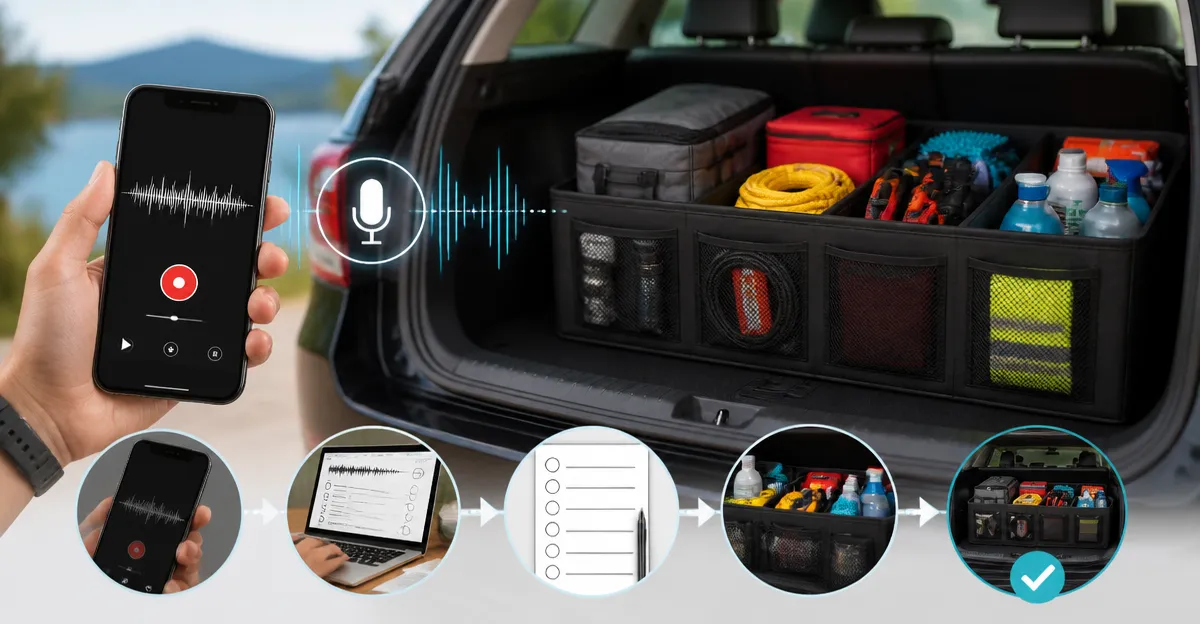
How to Use Voice Memos to Create the Ultimate Packing Checklist for Trunk Organizers (Step-by-Step)
This guide explains how one can transform simple voice memos into a comprehensive packing checklist and then apply that checklist to organize a vehicle trunk efficiently. By following each step, the reader will learn to capture, transcribe, categorize, and physically arrange items using proven organizational tools. The result is a clutter‑free trunk that maximises space, protects fragile goods, and reduces the stress of last‑minute packing.
What You Will Need
- Smartphone with a voice‑memo app
- Computer or tablet for transcription (optional)
- Pen and paper for quick notes (optional)
- One or more trunk‑organizing products (recommended below)
The products listed are available on Amazon and have been selected for their durability, price‑to‑value ratio, and high customer satisfaction.
Step 1: Record Your Packing Ideas Using Voice Memos
Begin by opening the voice‑memo application on the smartphone. Speak clearly and enumerate each category of items that will be transported, such as "groceries, camping gear, sports equipment, and emergency supplies." It is advisable to pause briefly between categories so that the transcription software can differentiate them later. This method captures spontaneous ideas without the need for manual typing, which can be cumbersome while preparing for a trip.
For items that require special handling, mention the required protection level. For example, say "fragile glass bottles need a padded container" or "wet towels should be stored in a waterproof bin." These details will guide the selection of appropriate organizers later in the process.
Step 2: Transcribe and Organize the Audio into a Structured List
Transfer the voice memo to a computer or use a transcription app on the phone. Convert the audio into text and edit the transcript to create a bullet‑point list. Group related items under headings such as "Food & Beverages," "Outdoor Gear," and "Cleaning Supplies." This structured list serves as the foundation for the physical arrangement.
At this stage, one can also assign a priority level to each group. High‑priority items are those needed immediately upon arrival, while low‑priority items can be placed at the rear of the trunk.
Step 3: Choose the Right Organizer for Each Category
With the checklist in hand, match each category to a suitable organizer. The JiatuA Collapsible Car Trunk Organizer is an excellent choice for larger, mixed‑size items because it offers high‑density dividers, waterproof 600D Oxford fabric, and multiple pockets. It measures 22" L × 12.5" W × 10.8" H when expanded, providing ample space for groceries, tools, and travel accessories. Priced at $16.99 with a rating of 4.7/5 from 796 reviews, it delivers strong load‑bearing performance while remaining affordable.
For items that require rigid support, such as canned goods or heavy equipment, the CleverMade Collapsible Shopping Basket offers a structured, stackable solution. Each basket holds up to 25 lb, folds flat to 2.25" for storage, and is made from recycled polypropylene. The 3‑pack costs $54.99 and holds a 4.5/5 rating from 2,249 reviewers, making it ideal for stacking produce or camping supplies.
Step 4: Allocate Items to Specific Bins and Secure Them
Place the items from the checklist into the chosen organizers. Use the JiatuA organizer’s front and rear pockets for quick‑access items like snacks, maps, and first‑aid kits. Store bulkier items, such as a cooler or spare tire, in the main compartment of the CleverMade baskets, taking advantage of their interlocking design to keep the crates stable.
To manage waste and small loose objects, incorporate the HOTOR Car Trash Can. This 2‑gallon, leak‑proof container features an adjustable strap, magnetic snaps for bag replacement, and a waterproof inner lining. Priced at $9.99 with a 4.5/5 rating from 54,687 reviews, it prevents spills from contaminating other goods and doubles as a storage pouch for cups or toys.
Step 5: Adjust for Waterproofing and Slip‑Resistance
If the trip involves outdoor activities where moisture is likely, the Femuar Waterproof Collapsible Car Trunk Organizer provides a water‑resistant solution. Its 600D Oxford fabric, reinforced stitching, and Velcro non‑slip bottom protect items from rain or mud. At $9.99 and a 4.7/5 rating from 5,391 reviewers, it offers excellent value for protecting electronics, wet clothing, or perishable foods.
Secure the organizers by using the JiatuA’s thickened dividers and the CleverMade baskets’ interlocking tabs. This prevents movement during sudden stops and maintains a tidy appearance.
Step 6: Review, Refine, and Save the Checklist for Future Use
After loading the trunk, walk around the vehicle and verify that each item is easily reachable and that the weight distribution feels balanced. If any item feels out of place, adjust the placement and update the checklist accordingly. Save the final checklist as a text file or note on the phone so that it can be reused for similar trips, reducing preparation time in the future.
For additional flexibility, consider the HOTOR 5‑Pocket Trunk Organizer. Its two large compartments and five extra pockets accommodate miscellaneous items such as sports gear, tools, and emergency supplies. The organizer can bear over 60 lb, folds flat for storage, and includes reflective strips for visibility. Priced at $9.99 with a 4.6/5 rating from 1,404 reviews, it serves as a versatile supplement to the primary organizers.
Tips & Pro Tips
- Record voice memos in a quiet environment to improve transcription accuracy.
- Label each organizer with a removable tag that matches the checklist category.
- Use the magnetic snaps on the HOTOR Car Trash Can to replace the liner quickly when it becomes full.
- Place heavier items at the bottom of the CleverMade baskets to maintain a low centre of gravity.
- Periodically clean the waterproof liners of the Femuar organizer to prevent mold growth.
Troubleshooting
Problem: Voice memo transcription contains errors.
Solution: Replay the audio while editing the text, or use a dedicated transcription service that supports punctuation.
Problem: Organizers shift during driving.
Solution: Ensure the interlocking tabs of the CleverMade baskets are fully engaged and the Velcro strips on the HOTOR 5‑Pocket Organizer are tightened.
Conclusion
By converting voice memos into a structured checklist and pairing each category with a purpose‑built organizer, one can achieve a highly efficient trunk layout. The process reduces packing time, protects fragile items, and creates a reusable system for future journeys. Implement the steps outlined above, and the vehicle trunk will become a model of order and accessibility.
Products Mentioned in This Guide
Frequently Asked Questions
How do I create a packing checklist from voice memos?
Record each item or category in your phone’s voice‑memo app, then transcribe the audio (manually or via speech‑to‑text) into a written list.
Do I need a computer to transcribe voice memos?
A computer or tablet is optional; many smartphones offer built‑in speech‑to‑text that can convert memos directly on the device.
What tools help organize the trunk after I have the checklist?
Use durable trunk‑organizer products such as bins, dividers, and collapsible crates to place items according to the checklist categories.
Why use voice memos instead of writing notes?
Voice memos capture ideas quickly while driving or on the go, reducing missed items and speeding up checklist creation.
How does a checklist improve trunk packing efficiency?
A checklist ensures every needed item has a designated spot, maximizes space, protects fragile goods, and eliminates last‑minute packing stress.